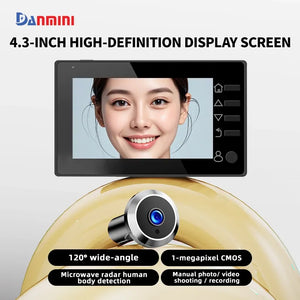
Danmini Visual Doorbell Peephole 4.3'' LCD HD Display Digital Door Viewer 1 Million Pixel 120° Camera Security Cat Eye Door Bell

Danmini Visual Doorbell Peephole 4.3'' LCD HD Display Digital Door Viewer 1 Million Pixel 120° Camera Security Cat Eye Door Bell

Silver 32G
Sale price  €117,45 Regular price  €162,62
Skip to product information
Danmini Visual Doorbell Peephole 4.3'' LCD HD Display Digital Door Viewer 1 Million Pixel 120° Camera Security Cat Eye Door Bell

Danmini Visual Doorbell Peephole 4.3'' LCD HD Display Digital Door Viewer 1 Million Pixel 120° Camera Security Cat Eye Door Bell

Sale price  €117,45 Regular price  €162,62
Color

SPECIFICATIONS

Alarm: No

Brand Name: DANMINI

Certification: CE,FCC,RoHS

Communication Interface: WireLess

Display: Color

Feature: Photograph,Video

Feature 1: 4.3 inch HD display

Feature 10: Video recording function, needs to be used with TF card, supports up to 32GB

Feature 11: Supports micro USB interface

Feature 12: Two power supply methods: 1800mAh high-capacity rechargeable lithium battery power supply, 5V1A external power supply

Feature 13: Support door aperture 15-22M, support door thickness 30-110mm

Feature 2: The appearance of the door machine is similar to traditional optical cat eyes

Feature 3: Built in hidden camera

Feature 4: 1 million pixel professional security camera with a 120 ° viewing angle

Feature 5: Microwave radar human detection, automatic capture and recording, guarding the safety of the doorstep

Feature 6: No red explosion night vision lights, super strong night vision, can monitor the situation outside the door day and night

Feature 7: Built in microphone, audio recording and monitoring

Feature 8: Zinc alloy material, anti-theft, anti pry, anti peeping from cat's eyes

Feature 9: Built in 4M memory, supports TF card free photography

High-concerned chemical: None

Item Type: PeepHole

Itercom: No

Origin: Mainland China

Power: Dry battery

Power Source: Dry battery

Smart home platform: NONE

Tips:

1.The first button is the menu button and the confirm button. Clicking the menu button will enter the main menu interface. The photo mode and video mode are the same icon. After selecting them, press the menu button to switch. The recording mode requires a card to be inserted before it can be used.

2.The sensitivity of the mobile monitoring function has three types: low, medium, and high, and can also be turned off.

3.This product has six languages, including English, Chinese, Russian, French, Italian, and Spanish, which can be changed in the settings.

4.The recording time can be set to automatically record for 10, 20, or 30 seconds, and you can adjust it according to your needs. After setting up, click the recording button to automatically record the video.

5.The photo quality can be selected from 1M, 2M, 3M. The larger the memory, the clearer the photo. You can adjust it according to your needs. When there is not enough memory, you can enter the main menu page, click on the album, enter it, select the unwanted photos, and click the menu button to delete them.

6.The number of photos can be set to 1, 2, or 3 per shot, and you can adjust it according to your needs. After setting up, press the photo button to take the desired number of photos at once.

7.The automatic screen shutdown time is 10, 20, and 30 seconds, and it can also be turned off, but it will cause the battery to consume quickly.

8.The light source frequency has two types: 50HZ and 60Hz. The higher the frequency, the higher the power consumption. You can adjust it according to your needs.

9.The formatting function will clear the contents of the memory card, please use it with caution. Resetting the system option will restore all product features to factory default settings.

10.This product has two power supply modes. You can use a 1800mAh rechargeable lithium battery or a 5V1A external power supply before testing and using it.

11.This product has infrared night vision function.

12.This product is a standalone peephole doorbell, and you cannot synchronize the screen to your phone through WiFi connection.

13.Due to manual measurement, please allow for a difference of 1-3CM.

Thank you for your understanding!!!

Handle the peephole camera cable with care during installation; do not pull it forcefully.

When installing, align the peephole connector with the display port and press down gently.

After connecting, do not drag the display unit by the peephole camera.

Dragging the camera may damage the internal wiring.

When removing, lift the display gently and carefully snap the peephole connector out from the left and right sides.


You may also like