
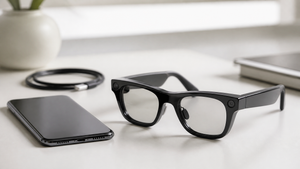

Walking around with a voice assistant that lives in your glasses—not in your phone—sounds futuristic. But a growing number of smart glasses are making it possible. The category includes frames with built-in microphones, speakers, cameras, and AI software that let you place calls, send messages, capture photos, and access information without touching a screen. The Tidesmit AI Smart Glasses with Voice Assistant and Camera are one of the latest entries, combining a voice assistant and camera in a pair of everyday frames.
In this article, we’ll walk through what AI smart glasses can do, the features that matter, and how they tackle common hands-free frustrations. Then we’ll take a closer look at the Tidesmit model and what to consider before you buy.
What Are AI Smart Glasses?
AI smart glasses are wearable eyewear that pack a voice assistant, usually a camera, a microphone array, and speakers into a familiar frame design. They connect to a paired phone via Bluetooth, offloading the heavy processing while keeping the glasses themselves lightweight. The voice assistant responds to spoken commands—much like a smart speaker—but it’s right there on your face. According to Meta, you can use AI glasses to make calls, dictate messages, ask questions, and get real-time information without taking out your phone.
The appeal is clear: hands-free productivity. Whether you’re in a meeting, on a bike, or carrying groceries, you can stay connected and capture moments without breaking your flow. The Dymesty AI Glasses product page, for example, emphasizes hands-free voice control, a 48-hour battery, and the ability to use the glasses without a camera—a design choice that sidesteps some privacy concerns. These glasses illustrate how the category is branching into different use cases, from professional daily wear to outdoor adventures.
Key Features of AI Smart Glasses
Most AI glasses hinge on two core features: a voice assistant and a camera. The voice assistant relies on a microphone array that picks up speech even in noisy environments, and Meta’s documentation explains that you can activate it with a wake word or a physical button. Commands can range from “send a WhatsApp message to Sarah” to “what’s the weather?” The assistant then responds through built-in speakers, often situated near the temples. The camera opens up other possibilities: snapping a photo of a business card, scanning a document, or recording a quick video without pulling out a phone. The Dymesty page notes that these glasses can help with “understanding documents or business cards,” a nod to the camera’s text-scanning potential.
Battery life, however, is where the options diverge sharply. The table below shows how a few models compare, based on source-reported specs. The range is wide—from a few hours of active use to a claimed 48-hour stretch.
| Product | Battery Life | Source |
|---|---|---|
| Dymesty AI Glasses | 48 hours | Dymesty |
| Ray-Ban Meta (Gen 1) | Up to 4 hours | Meta |
| Ray-Ban Meta (Gen 2) | Up to 8 hours | Meta |
| Oakley Meta HSTN | Up to 8 hours typical use | Meta |
| Oakley Meta Vanguard | Up to 9 hours typical use | Meta |
These numbers are maximums under ideal conditions. Continuous audio streaming, camera use, and AI processing will drain the battery faster. The Dymesty figure, at 48 hours, is an outlier—it’s likely achieved in standby mode, not while you’re actively using the voice assistant. Still, it’s a clue that different glasses optimize for different things: some prioritize compactness, others endurance.
How AI Glasses Solve Common Hands-Free Problems
Reaching for your phone to check a notification feels minor, but it adds up—especially when you’re in the middle of a task. AI glasses aim to keep you in the moment. The Dymesty product page lists several pain points that these devices address: ambient noise interfering with voice input, the need to type in reminders later, and the struggle to understand documents or business cards on the fly. A four-microphone array, like the one in Dymesty glasses, can help isolate your voice even on a busy street, reducing the frustration of repeating yourself. And instead of fumbling for a notepad, you can snap a photo of the document and have the AI read it back or transcribe it.
Language barriers are another problem. Some AI glasses include real-time translation features, letting you hold a conversation with someone who speaks a different language. The assistant can translate your speech and relay the response, all through the glasses’ speakers. On a long commute or in a meeting, the ability to ask a quick question without pulling out a phone can be a subtle but significant productivity boost. Dymesty categorizes its glasses into three styles: professional daily wear (for office, legal, and healthcare settings), a design-forward creative look, and an outdoor version with UV protection. That framing suggests these are tools meant to blend into your actual life, not just another gadget.
Introducing Tidesmit AI Smart Glasses
The Tidesmit AI Smart Glasses with Voice Assistant and Camera bring a voice assistant and a built-in camera to a pair of smart eyewear. As the name indicates, you can use voice commands to control the glasses and access AI-driven help, while the camera enables photo and video capture. This combination puts them in the same category as other AI glasses that aim to keep you hands-free while staying connected.
While detailed specifications like battery life, frame material, and microphone configuration aren’t covered in this article, the product page will have the full rundown. The potential use cases are straightforward: making calls, asking the AI assistant for information, capturing moments without pulling out your phone, and scanning documents. For anyone who’s tired of juggling a device while multitasking, the Tidesmit glasses offer a way to keep your hands free and your attention on the world around you.
Tidesmit AI Smart Glasses with Voice Assistant and Camera
The Tidesmit model includes a voice assistant and camera, as its name suggests. You can expect the usual hands-free calling and messaging capabilities, plus the ability to snap photos or record short videos with a voice command or a button press. The camera might also help with scanning text—something that’s handy for business cards, signs, or quick notes. Because the glasses are designed to work with a paired phone, you’ll likely need to install a companion app. For the full list of features and technical details, visit the product page.
Privacy, Battery Life, and Other Considerations
Glasses with a camera raise obvious privacy questions. Meta’s guidance on AI glasses notes that a visible LED indicator turns on when the camera is active, and that data is processed according to the company’s privacy policy. Still, the presence of a camera changes how people around you may feel. It’s smart to be aware of local laws and social norms—some spaces, like locker rooms or private meetings, may not be camera-friendly. The Dymesty glasses take a different approach by omitting the camera altogether, which removes that worry entirely. That’s a reminder that not all AI glasses are created equal on the privacy front.
Battery life is another practical concern. As the table earlier showed, you could get as few as 4 hours of use or as many as 48, depending on the model and how you use it. A pair of glasses that lasts all day on a charge might be essential if you’re in back-to-back meetings, while a shorter battery might be fine for a quick commute. Compatibility is also key: most AI glasses need a paired phone and a companion app to work. They often support platforms like iOS VoiceOver, and messaging apps like WhatsApp and Messenger. Without that phone link, the glasses lose much of their smarts. So before buying, check that your phone is compatible and that the apps you rely on are supported.
Frequently Asked Questions About AI Smart Glasses
What can AI smart glasses do with a voice assistant?
Voice assistants on AI glasses let you make calls, send messages, ask questions, and control features hands-free. According to Meta, you can also use voice commands to capture photos or videos, which is helpful when your hands are occupied.
How long does the battery last on typical AI glasses?
Battery life varies widely: from up to 4 hours on older Ray-Ban Meta (Gen 1) to a claimed 48 hours on Dymesty AI Glasses. The Ray-Ban Meta (Gen 2) and Oakley Meta models typically last 8–9 hours of regular use, though continuous audio or camera use will shorten that.
Are AI glasses with cameras safe to use in public?
They can be safe if you use them responsibly. Meta’s glasses include an LED indicator that lights up when recording, and the company advises being mindful of others. Always follow local laws and etiquette, especially in sensitive areas like bathrooms or private gatherings.
