
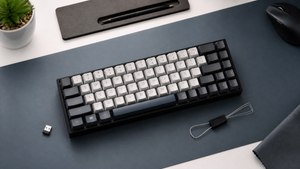

The RK68 60% Wireless Mechanical Keyboard has been a staple in the budget mechanical keyboard conversation for a few years now. With a compact 65% layout, hot-swappable switches, and the ability to hop between five Bluetooth devices, it checks a lot of boxes for a price that usually sits under $50.
But the market hasn’t stood still. Newer budget boards have raised the bar on keycap materials, switch quality, and battery life. The question isn’t whether the RK68 was a good deal—it’s whether it still holds up in 2026. Here’s a look at what it gets right, where it stumbles, and who should still consider it.
Verdict: Is the RK68 Still Worth It in 2026?
Yes, if you’re hunting for a low-cost 65% keyboard with hot-swap sockets and broad Bluetooth connectivity, the RK68 remains a solid choice. Its ability to pair with up to five devices and switch between them on the fly is still a standout feature at this price, as noted by Switch and Click’s review. The hot-swappable PCB lets you drop in new switches without soldering, which gives you a lot of room to experiment without spending more on a whole new keyboard.
That said, the value proposition isn’t as airtight as it once was. Many newer budget alternatives now come with PBT keycaps, quieter switches, and longer battery life—areas where the RK68 shows its age. For someone who just wants a functional, customizable mechanical keyboard and doesn’t mind charging nightly or living with a slightly wobbly spacebar, the RK68 still earns its keep. For anyone prioritizing a more refined typing experience or all-day wireless use, the landscape has shifted enough that it’s worth looking at what’s new.
Key Features and Specifications
The RK68 (also known as the RK855) packs a surprising amount of flexibility into a small footprint. Its 68-key layout—a 65% form factor—keeps the arrow keys and a few navigation keys while ditching the function row and numpad, saving desk space. The keyboard uses mechanical TTC switches, and the PCB is hot-swappable, meaning you can pull out the stock switches and press in compatible replacements without any soldering. That’s a big draw for anyone who wants to try different switch types down the road.
Connectivity is the headline feature. The board supports Bluetooth 5.0 with the ability to pair up to five devices, plus a 2.4GHz wireless mode via a dual-mode 2-in-1 receiver. There’s also a USB-C wired option for charging and direct connection. The backlighting is a simple blue LED, not RGB, and the keycaps are OEM profile double-shot ABS. The whole thing comes in a white plastic case, and the price stays under $50, making it one of the most accessible hot-swap keyboards you can buy.
According to the manufacturer’s own product notes on RK Royal Kludge’s blog, the keyboard is designed for straightforward setup—charging via any USB wall charger, and pairing devices through a simple key combination. No software is required, which keeps things uncluttered.
Wireless and Bluetooth Performance
Pairing is quick and intuitive. Hold Fn + Q, W, or E to enter Bluetooth mode, and the RK68 will show up on your device’s list. You can store up to five connections and rotate through them with Fn + the corresponding key. In practice, this means going from a laptop to a tablet to a phone without re-pairing each time. The 2.4GHz dongle provides a lower-latency connection for gaming, and the dual-mode receiver means you don’t have to swap out hardware when switching between Bluetooth and 2.4GHz.
The real friction point is battery life. The RK68’s battery needs frequent charging—many users, including the reviewer at Switch and Click, report that it requires nightly charging with regular use. That’s a marked difference from newer budget keyboards that can last weeks on a single charge. The included USB-C cable handles both charging and wired mode, but there’s a catch: the cable may not work with Mac computers. If you’re on a Mac, you’ll likely need to rely on Bluetooth or use a third-party USB-C cable for a wired connection.
For a desk setup where you’re near a charger, the nightly top-up isn’t a dealbreaker. But if you want to toss a keyboard in your bag and forget about the cable for a few days, this won’t be the one.
Build Quality and Typing Experience
The RK68 uses an ABS plastic case with a white finish, and the keycaps are OEM profile double-shot ABS. The overall look is clean, but the materials are what you’d expect at this price. A closer look—or a darker room with the blue backlight on—reveals shiny silver screws visible through the case, according to RK Royal Kludge’s own description. It’s a small aesthetic quirk, but one that some users might find distracting.
The typing experience is a mixed bag. The TTC switches require a bit of force to actuate and produce noticeable noise. That may be satisfying if you like a more resistant, clicky feel, but it’s not for everyone. The spacebar stands out—literally. It wiggles slightly more than larger mechanical keyboards and makes a sound that’s noticeably different from the rest of the keys. The same source notes that the keyboard lacks any kickstand adjustments, so you’re stuck with the built-in typing angle.
On the positive side, the double-shot ABS keycaps are decently legible, with legends that won’t wear off quickly. However, the ABS plastic itself will develop a shine over time, which is a common trait of the material. For a keyboard you plan to use heavily for years, that’s something to keep in mind.
Trade-offs: Who Should and Shouldn't Buy the RK68
The RK68 makes a strong case for a specific type of user: someone who wants hot-swap sockets, multi-device Bluetooth, and a compact layout without spending more than $50. If you’re comfortable charging a keyboard each night, don’t mind a louder typing sound, and want to tinker with switches later, this board fits the bill.
It’s less ideal for several other groups. Gamers who need the lowest wireless latency and battery life that lasts through a weekend of sessions will likely find the RK68 frustrating. Users who want PBT keycaps for a more textured, shine-resistant feel, or quieter switches, should look at newer options. The TTC switch lifespan is an unknown—there’s no documented rating, so long-term reliability is a question mark. The lack of kickstand adjustments and the visible screws through the case are small but persistent reminders that this is a budget-first design.
If you’re a Mac user, the Bluetooth connection works, but the wired mode may give you trouble. And if you’re coming from a larger keyboard, the spacebar’s wiggle and different sound signature might be jarring. For a first mechanical keyboard or a secondary travel board, the RK68 still has a lot to offer. For a daily driver you’ll rely on for years, it’s worth exploring what a slightly higher budget can buy.
Alternatives to Consider in 2026
The RK68’s biggest competition isn’t any single board—it’s the general progress of budget mechanical keyboards. Over the past few years, PBT keycaps have become much more common at lower prices, battery life has improved, and switch options have expanded. So while the RK68 can still hold its own, it’s worth knowing what you’re missing by not spending a bit more.
A quick comparison highlights the key differences:
| Feature | RK68 | 2026 Budget Alternatives | Note |
|---|---|---|---|
| Connectivity | Up to 5 Bluetooth devices | Often 3 devices | RK68 offers more simultaneous pairings |
| Keycaps | ABS, double-shot | PBT, double-shot common | PBT resists shine and feels more textured |
| Switches | TTC, lifespan unknown | Often rated for 50–80 million presses | Newer switches may be quieter and smoother |
| Build | Plastic, no kickstand | Plastic or aluminum, adjustable feet | Adjustable angle improves ergonomics |
If you’re curious about specific upgrade paths, the Keychron Q5 Max and NuPhy Air75 V3 are often mentioned as starting points for research. Neither is a direct budget counterpart, but they illustrate where the market has moved: PBT keycaps, longer battery life, and quieter, more refined switch options. The RK68 remains a fine entry point—just don’t expect it to keep pace with boards that have learned from its compromises.
Frequently Asked Questions
Is the RK68 hot-swappable?
Yes. The RK68 has a hot-swappable PCB, so you can remove and replace the switches without soldering. It comes with TTC switches out of the box, but the sockets accept most standard mechanical switches if you want to customize the feel later.
How many devices can the RK68 connect to via Bluetooth?
The keyboard can pair with up to five Bluetooth devices and switch between them using a simple key combination. That’s more than most budget keyboards, which typically top out at three connections.
Does the RK68 work with Mac computers?
It can connect to a Mac via Bluetooth without issue. However, the included USB-C cable may not work with Mac computers, as noted in the product’s documentation. For a wired connection, you’ll likely need to use a third-party USB-C cable or stick with Bluetooth.
