
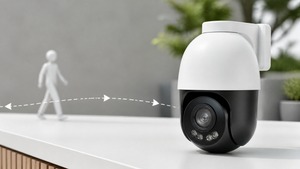

A figure moves across the driveway and the camera swings to follow. It’s the kind of tracking that once belonged only to big-budget surveillance montages, but over the last few years it has quietly arrived in outdoor cameras aimed at homes and small businesses. The difference is that real-world AI tracking relies on a mix of motorized lenses, pattern recognition, and careful placement—not on a control room operator with a joystick. For anyone sorting through the noise of motion alerts, understanding how auto-follow and cross-camera tracking actually work makes it easier to judge which setup fits a specific property.
What AI Auto-Follow and Cross-Camera Tracking Mean
Auto-follow—often called auto-tracking—is the ability of a PTZ (pan-tilt-zoom) camera to move its lens in response to a detected person or vehicle, keeping that subject in the frame without manual input or a looping patrol pattern. It’s not simply motion detection with a moving camera; the camera’s onboard processing classifies the object first, then decides whether to pivot and zoom. As eufy’s auto tracking camera guide explains, the feature relies on algorithms that distinguish a human or car from a tree branch, with PTZ motors adjusting the field of view afterward.
Cross-camera tracking is a different layer. Where auto-follow keeps a subject inside a single camera’s line of sight, cross-camera tracking attempts to link that same person or vehicle across multiple cameras in a system. A delivery driver might first appear on a driveway cam, then reappear on a side gate module three seconds later; the system stitches those two appearances into one logical path. This only works when camera views overlap or sit close enough to bridge the gap, and it requires the backend software to share tracking metadata. It’s a product of video analytics rather than a default feature on every outdoor camera, and it depends heavily on site layout.
Neither capability is magic. Auto-follow won’t lock onto a face like a Hollywood thriller, and cross-camera tracking can’t reconstruct movement where cameras don’t cover the space. They sit under the same tent of AI-enhanced pattern recognition, but they solve slightly different problems: one keeps a moving target from leaving the frame, the other fills in the story when that target moves between frames.
How Outdoor Cameras Detect and Track a Moving Subject
When a person steps into view, the camera doesn’t just trigger a generic alert. It walks through a series of steps that many outdoor AI cameras now handle on-device. Initially a standard motion sensor picks up a change in the scene, but rather than shouting “motion detected,” the camera’s processor runs the blob through a classification model—often labeled human detection or vehicle detection—to rule out wind, shadows, and small animals. Once the object is confirmed as a target category, the PTZ motors engage to pan, tilt, or zoom the lens so the subject stays near the center of the image. The entire loop, from detection to a locked follow, might happen inside a second.
This kind of analytics-driven PTZ movement is what separates an auto-tracking camera from older manual PTZ cameras that only respond to button presses or preset patrols. It also separates it from fixed-lens cameras that must record a static view and hope the action stays inside it. Analog security systems don’t offer auto-tracking at all; the intelligence requires a digital pipeline that can run recognition algorithms, which is why the feature lives on modern IP cameras. A camera like the IPTZ4K40 pushes out to 40X zoom, and the IPTZ4K48ULT reaches 48X zoom, giving the lens enough reach to pull detail from across a large yard while the tracking logic keeps the subject framed. But the zoom number alone doesn’t tell the whole story—the camera still has to recognize a moving object as a person or vehicle before that reach matters.
Many outdoor PTZ models carry a “starlight” designation for low-light performance, a sensor design that lets them capture a usable image in near-darkness. That can be the difference between a tracked silhouette and a blob that the algorithm ignores. Still, the tracking ability is bound by the same visibility limits as any lens; a camera that can’t see the subject clearly won’t follow it cleanly, no matter how smart the processor is. The pattern recognition models improve steadily, but they are not infallible. A subject that moves erratically, or a scene with overlapping figures, can still cause the camera to lose its lock.
Limits, False Alerts, and Privacy Trade-offs
AI tracking does not banish false alerts. A flapping tarp, a moving shadow at dusk, or a squirrel dashing past can still fool the classification engine, even if the hit rate is far better than old pixel-change detectors. The detection area itself needs to be wide enough to contain the entire person or vehicle—a camera zoomed in too tightly may miss the trigger, while one aimed too wide may classify poorly. Placement almost always takes a few rounds of tweaking, and a location that looks perfect on paper may disappoint once branches start swaying.
Processing architecture adds another fork in the road. When a camera sends footage to the cloud for analysis, it can lean on beefier algorithms and even cross-reference events across multiple cameras more efficiently. But that route piles on latency, eats bandwidth, and, for some users, introduces privacy anxiety about video leaving the property. Edge AI processing, by contrast, keeps classification and tracking logic on the device itself. Alerts come faster, bandwidth demand shrinks, and the raw video stays local. The trade-off is that the camera’s onboard chip may miss complex patterns that a cloud server could catch—though the gap has narrowed in recent years.
Storage follows a similar tension. Local recording to an SD card or an NVR costs nothing month-to-month and offers instant playback. But a camera ripped from its mount takes its footage with it. Cloud storage offloads that risk for a monthly fee, giving an offsite backup that survives hardware theft. A hybrid approach saves event clips locally but also uploads critical moments, which can feel like the best of both worlds—yet it doubles the setup and storage management. A camera that records the clearest footage of a trespasser might also be the simplest one to steal, so the decision between storage types often comes down to how likely physical tampering feels.
Visible auto-tracking movement itself cuts two ways. A camera that swivels to follow someone is certainly more intimidating than one that stares straight ahead, and that alone may discourage casual prowlers. But intimidation is not the same as crime prevention; the motion can also draw attention to the camera’s blind spots, and an aggressive track toward a neighbor’s window raises its own set of concerns. No feature on a spec sheet guarantees security outcomes.
Setup and Placement Considerations for Outdoor AI Tracking
The ideal mounting point for an auto-tracking camera often looks different from what a fixed-camera install would suggest. Because the camera needs to detect a full person or vehicle at the edge of the frame before it can start to follow, the field of view at the entry zone must be generous. A camera mounted too high might record the tops of heads but miss the body shape the AI relies on; too low, and background objects crowd the detection space. Most eyeball tests at ground level don’t account for how the lens sees things at 20 or 30 feet, so a bit of trial and error with live view is almost a given.
Before committing to a spot, checking the Wi-Fi signal strength there is worth the time. Auto-tracking cameras are often placed in corners or under eaves where reception drops, and a spotty connection can interrupt the stream of tracking metadata even if the camera is still recording. For locations far from an electrical outlet, a 5.5W SolarPlus 2.0 panel can trickle-charge the camera, but the panel needs a clear southern exposure and enough sunlight to handle both the camera’s daily consumption and the extra bursts of PTZ motor activity. A few overcast days won’t immediately kill the battery if it’s sized correctly, but relying on solar without verifying the local weather trends can lead to a dead unit during the season you need it most.
One auto-tracking camera can sometimes replace two or three fixed cameras by sweeping across a wider arc, which cuts down on hardware and installation time. But the coverage geometry still rules: a single PTZ camera can only look in one direction at a time. If a subject appears behind the camera’s current aim, there’s no second lens to catch it. That’s why installers often pair a wide-angle fixed camera with a PTZ unit, letting the first act as a persistent spotter while the second handles the follow.
Frequently Asked Questions About Outdoor AI Tracking
Is auto-tracking the same as Smart Motion Detection?
No, they’re separate features that often ride on the same camera. Smart Motion Detection refers to the AI’s ability to label what triggered the alert—person, vehicle, or animal. Auto-tracking is the motor-driven movement that follows the subject after classification. A camera can possess Smart Motion Detection without auto-tracking, but most auto-tracking cameras include the detection piece to decide when to begin following.
Do auto-tracking cameras work like they do in TV shows?
Real auto-tracking is far less cinematic. The camera may hesitate, lose a target during rapid movement, or get fooled by intersecting objects. It won’t fluidly track a running figure through a crowded street as a TV helicopter shot would. The limits section above goes deeper into the constraints, but the short version is: useful, not magical.
